TL;DR
A WiFi baby monitor sends video or sensor information over your home network so you can check in through an app, sometimes from outside the home. Compare offline access, night vision, alerts, recording costs, and account security, and treat wellness claims cautiously: a consumer monitor does not replace supervision, safe-sleep practices, or pediatric guidance.
Your phone can show you a dark nursery from the kitchen, the backyard, or across town. That convenience is the main appeal of baby monitors with WiFi, but it also means your check-in depends on a camera, a network, an app, and sometimes a cloud service all working together.

Turn the school run and nap time into listening time
- Thousands of audiobooks, podcasts and originals
- Listen on your phone, tablet or Echo — also offline
- Cancel anytime
This guide explains what they are, which features matter in everyday use, and where the trade-offs show up at 2 a.m. You’ll also get practical questions to ask before buying, a straightforward security routine, and a clear distinction between ordinary monitoring and health-related claims.
For example, imagine your baby stirs while you’re folding laundry upstairs. A sound alert and a quick video check may help you see whether you need to go in. If the router drops offline, though, that same phone view may disappear. Knowing what your monitor can do—and what it can’t—helps you choose with your eyes open.
A WiFi baby monitor sends video or sensor data over a network; remote viewing also depends on internet and app service.
Check offline operation, a dedicated parent unit, and alert sensitivity before you buy.
Compare local and cloud recording, including subscription fees, retention terms, and access controls.
Use unique passwords, two-factor authentication where available, updates, and careful caregiver sharing.
Treat breathing or wellness features cautiously; follow safe-sleep guidance and ask a pediatrician about medical concerns.
See how a WiFi monitor gets the nursery to your phone
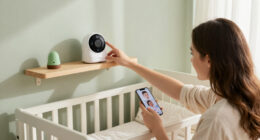
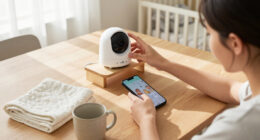
A WiFi baby monitor uses a camera or other sensor to send a live feed over your home network to an app or parent screen. With internet access and a compatible service, you can often view it away from home, too. The route matters because local viewing and remote viewing have different dependencies: a local connection may work while your internet provider is down, while a remote feed usually needs both your home connection and the app service.
Most camera models offer live video and infrared night vision, which can turn a dark room into a grainy black-and-white view. That picture is useful for checking posture or whether a sound came from the baby, but image quality depends on placement, lighting, and network performance. Some add two-way audio, so you can hear a rustle and speak through the camera. Depending on the product, alerts may flag sound, crying, motion, temperature, or humidity; these sensors detect defined signals, not every situation that might need a caregiver’s attention.
Say you’re making tea and hear a faint sound through the app. Video may show your baby has shifted position but settled again; an audio-only monitor would tell you there was a sound, without the picture. The added context can help you decide whether to go in, though looking at a screen still requires you to notice and interpret what is happening. A phone alert can be missed if the phone is muted, the app closes, or a call interrupts. Some systems include a dedicated parent unit, providing a separate access path that may be useful when your phone is busy.
Recording is separate from live viewing. A camera may save footage to a memory card, a cloud service, or both, and cloud recording may require a subscription. Local storage can avoid recurring fees, but footage may be lost if the card is damaged or the camera is taken. Cloud storage can make clips easier to access elsewhere, while introducing an account, provider, and retention policy to consider. A wearable or under-mattress device that tracks movement or other signals is a different kind of product from an ordinary camera monitor, even when it connects to the same app; its measurements and health-related claims need separate scrutiny.
Products Worth Considering

LEGO Technic Yamaha MT-10 SP Motorcycle Building Set (42159)

Owlet Dream Duo 3 Smart Baby Monitor System with Floor Stand

Graco Extend2Fit 2-in-1 Convertible Car Seat, Kenzie
As an affiliate, we earn on qualifying purchases.
Weigh the convenience against the connection it depends on
WiFi baby monitors make it easier to check in from different places, but remote viewing relies on working equipment and connections. At home, that can mean the camera has power and the network is up; away from home, the internet and app service also need to work. Each added link brings flexibility, but also another point where access can fail. This is why a feature list alone can be misleading: a remote view is valuable only when the whole path from camera to phone is available when you need it.
Picture a caregiver sitting on the porch while a baby naps inside. A quick glance at the app may offer reassurance without interrupting the quiet. But if the router restarts or the internet provider has an outage, the picture or alerts may stop. Some models keep a local connection or provide a dedicated parent unit; others rely heavily on WiFi. Check the manual for what remains available offline, and distinguish between losing remote access and losing all monitoring. That distinction tells you whether the device has a useful fallback or whether you’ll need another way to listen.
Alerts also need a little patience. A motion alert may fire when a curtain shifts, while a quiet sound might not trigger the setting you chose. More sensitive settings may catch quieter activity but can also create more interruptions; less sensitive settings may reduce nuisance alerts while missing sounds you hoped to hear. Repeated false alarms can lead caregivers to silence notifications, which removes the very prompt they bought the monitor for. Adjust sensitivity where possible and check how the system behaves in your room. Treat alerts as useful prompts, not as a substitute for listening, checking, or responding to your baby.
A practical buying comparison starts with your routine: do you mainly want clear sound from the next room, or do you need remote video for a caregiver who travels? Reliability for your household may matter more than a long feature list. If your phone is already your alarm clock, map, and work line, a separate unit or an audio monitor can reduce dependence on one device and its battery, settings, and notifications. Choosing a simpler device can mean giving up remote viewing or recordings, but it may also reduce the number of services and settings you depend on. The right trade-off is the one that leaves you with a dependable way to notice and respond.
| Feature | What it can offer | What to check |
|---|---|---|
| Remote video | View the nursery away from home | Needs internet access and app support |
| Dedicated parent unit | A separate screen or receiver | Find out whether it works during internet outages |
| Motion or sound alerts | A prompt when activity is detected | Check sensitivity controls and possible false alarms |
| Recording | Save clips or longer footage | Compare local storage, cloud terms, and subscription costs |
Lock down the camera with a short security routine
A connected nursery camera needs account and network security, just like other devices in your home. No internet-connected product can be described as completely risk-free, so focus on practical safeguards: use a unique, strong password for the monitor account, switch on two-factor authentication if offered, and install app and camera updates. A unique password limits the damage if a password used on another service is exposed; two-factor authentication makes a stolen password less likely to be enough on its own. Updates can fix known software weaknesses, so keeping them current matters throughout the time you use the camera—not only during setup.
Consider a family that gives both parents and a grandparent access during the first weeks at home. Individual accounts, when available, make it easier to remove one person’s access later without changing everyone else’s login. Review who can see the feed after a caregiver’s schedule changes. This is a practical privacy step as well as an account-management convenience: access can accumulate over time, and a shared password makes it difficult to know who still has it or to revoke access for just one person.
Check where recordings go before you turn them on. Local storage may keep footage within your home and avoid a recording subscription; cloud storage can make clips easier to reach remotely, but it raises questions about fees, retention, and data handling. Think through the trade-off: local footage may be unavailable if the card or camera is lost or damaged, while cloud access depends on the provider’s account and service. Read the manufacturer’s privacy policy and look for a clear support period and update history. These details indicate how long the product may receive fixes and what happens to stored clips; product terms can change, so confirm current details rather than relying on an old review.
Limit the view to what you need. Aim the camera at the sleep space instead of the whole room, and avoid posting clips or sharing a live feed publicly. A narrower view reduces how much private activity is captured if someone accesses the account or a recording is shared. Treat camera placement as part of safety, too: follow mounting and electrical instructions, secure cords out of a child’s reach, and keep the camera and cords away from the crib. A tidy installation is safer and also avoids moving the camera later to solve an avoidable placement problem.
Treat breathing and sleep claims with care
A consumer baby monitor does not replace safe-sleep practices or supervision. Some products add a wearable or under-mattress sensor and advertise movement, breathing, or wellness tracking. Those products differ from an ordinary camera, and a connection to an app does not by itself make a device a medical monitor. A sensor reports only the signal it measures under its designed conditions; that leaves room for missed readings, false alarms, and situations outside its intended use. An app label or alert should not be read as a diagnosis or a guarantee that a problem will be prevented.
The American Academy of Pediatrics advises against relying on home cardiorespiratory monitors to reduce the risk of sleep-related infant death. This distinction matters because a monitor may provide data without proving that using it improves health outcomes. A consumer sensor can produce a false alarm or fail to detect a problem, creating either unnecessary worry or misplaced confidence. False alarms can prompt repeated checks and disrupt sleep, while a quiet app may tempt a caregiver to assume everything is well. If a product makes a health-related claim, check its regulatory status and supporting evidence, and ask your pediatrician about individual medical concerns.
For instance, a parent might see a movement alert while the baby is sleeping peacefully, then spend the rest of the night watching the app. That is a real cost of an alert system, even if the device is functioning as designed. Repeated alerts can also make it harder to tell which ones need action. Focus first on established safe-sleep guidance and use a monitor for the job it can reasonably do: help you hear or see what is happening in the room.
There’s a useful analogy here: a monitor is like a smoke alarm for information, not a firefighter. It can alert you to a signal, but it cannot take the next step for you or guarantee that every risk is caught. If a baby has a medical need, follow the care plan from the child’s clinician rather than substituting an unverified consumer feature.
Compare the details that matter before you buy
The best monitor is the one that fits your room, network, and nighttime routine. Start with the basics: clear audio, useful night vision, dependable operation, and a realistic backup if WiFi or your phone is unavailable. These basics affect whether the device is usable at the moment you need it. A high-resolution image can look impressive on a product page, but it may matter less than hearing a small cry clearly through a closed bedroom door.
Use this short checklist while comparing models. If you’re choosing between a camera that only works through an app and one with a parent unit, ask what each can do when the internet goes down. That reveals whether the second option is a genuine backup or just another screen using the same connection. If you’re deciding whether to pay for recording, find out what the camera saves without a subscription and what happens when a free trial ends; otherwise, a feature you rely on could disappear or become an unexpected recurring cost.
- Check the connection: Does the monitor work locally if internet access fails? Is there a dedicated parent unit?
- Check the view and sound: Compare field of view, night-vision clarity, and audio quality in the actual room layout.
- Check alerts: Which sounds or movements trigger notifications, and can you adjust sensitivity?
- Check storage and access: Is footage stored locally, in the cloud, or both? How many caregivers can join, and can you revoke access?
- Check the product details: Review mounting instructions, cord placement, software support, and any health-related claims.
Picture a narrow nursery with the crib tucked beside a wall. A wide-angle lens might cover the sleep space without a complicated mount, while a camera with a narrower view may need more careful positioning. Testing the view in the actual room can prevent buying a feature that sounds useful but misses the area you need to see. For any child product, check age-appropriateness and search the CPSC recall database for recalls before use. That quick check belongs alongside price and app reviews, especially if you’re buying secondhand or receiving a hand-me-down.
There is no universal winner. A family that travels may value remote viewing and sharing, while a household with spotty internet may prefer a dedicated unit or audio-only device. The useful question is not how many features a model lists; it’s whether its essential features will work where and when you need them, and whether the trade-offs are manageable for your caregivers.
Build a backup plan for the nights when an app fails
A simple backup makes a phone-based monitor easier to live with. Before the first nap, learn which parts work without WiFi, keep the app notifications configured, and decide how you’ll listen if the phone is charging or unavailable. The point is to know the failure mode in advance: losing remote viewing may be inconvenient, while losing every way to hear the baby calls for another arrangement.
Try the setup during the day. Put the camera where you plan to mount it, connect it, and walk to the spot where you expect to use the app. Test the sound and night view, then check what happens if you briefly disconnect your phone from WiFi. If there’s a parent unit, see whether it stays connected. A test won’t promise future service, but it can reveal weak signal areas, confusing settings, or a backup that still depends on the same router.
Suppose one parent uses the phone for a late work call while the baby naps. A separate audio monitor, a dedicated parent screen, or another agreed listening arrangement may keep monitoring available. Choose a backup that your household will actually use and keep it charged and accessible; a spare device buried in a drawer is about as helpful as an umbrella left at home in a downpour.
Also keep expectations realistic when you’re away from home. Remote access may stop during an outage or service disruption, and app notifications can be delayed or missed. A monitor can add convenience to caregiving, but it should never be the only plan for responding to a child who needs attention.
Frequently Asked Questions
Can I view a WiFi baby monitor away from home?
Usually, if the monitor has internet access and its app supports remote viewing. An outage or service disruption can stop remote access, so check whether the model offers another way to monitor locally.
Will a WiFi monitor work if my internet goes down?
It depends on the model. Some have a local connection or dedicated parent unit, while others rely on WiFi for video and alerts; check the manual to see what remains available offline.
Are baby monitors with WiFi safe from hackers?
No connected device is guaranteed to be immune. A unique password, two-factor authentication if offered, timely updates, a secured home router, and careful caregiver access can reduce risk.
Do I need to pay a subscription?
Not always. Live viewing may be included while cloud recording, longer clip history, or advanced features cost extra; check what is included after any free trial ends.
Can two parents or caregivers watch at once?
Many monitor apps support multiple users, but access limits and sharing controls vary. Use individual accounts when available, and remove access when a caregiver no longer needs it.
Can a baby monitor replace checking on my baby?
No. A monitor is a convenience tool, not a substitute for appropriate supervision or safe-sleep practices. For sleep or medical concerns, follow pediatric guidance.
Do breathing or movement monitors prevent SIDS?
Home monitors have not been shown to prevent SIDS. The American Academy of Pediatrics advises against relying on home cardiorespiratory monitors to reduce the risk of sleep-related infant death; ask your pediatrician about individual medical concerns.
Conclusion
Choose a monitor around the moments you need it: a clear sound from the next room, a reliable view during a nap, or remote access when another caregiver is on duty. Then check its offline limits, storage terms, security settings, age-appropriateness, and CPSC recall status.
Keep one backup way to listen, and remember what the camera is for: a helpful window into the nursery, not a substitute for your care. Even the sharpest night vision can’t replace a parent who knows when to walk in.