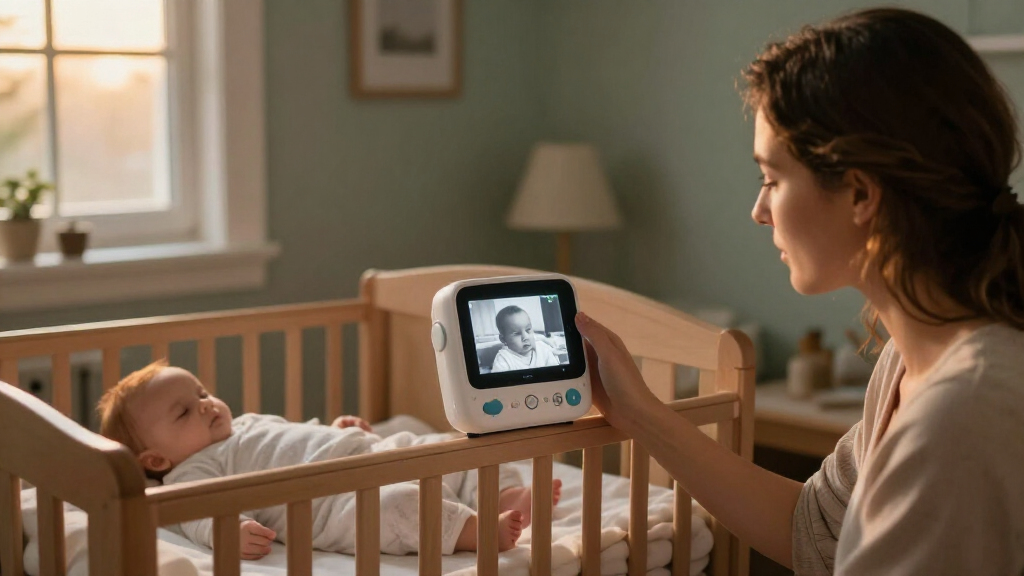

Choose and set up a baby monitor with night vision so you can check your baby’s sleep space in low light. This guide is for caregivers setting up a monitor for the first time or replacing an existing one; no technical experience is needed. Allow about 30-60 minutes to compare features, install the camera, and test the picture and alerts.

Turn the school run and nap time into listening time
- Thousands of audiobooks, podcasts and originals
- Listen on your phone, tablet or Echo — also offline
- Cancel anytime
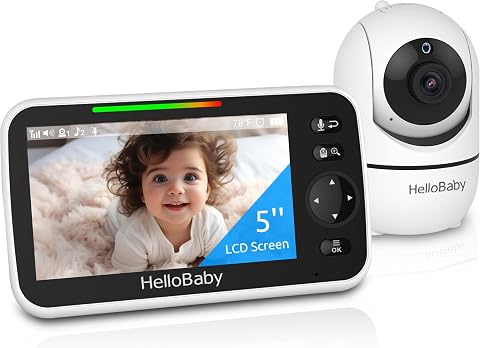
HelloBaby HB6550 No-WiFi Baby Monitor with Camera and 5-Inch Screen
- ✔ Screen: 5-inch color display
- ✔ Night vision: Infrared
- ✔ Camera movement: 355° pan; 120° tilt

HelloBaby HB6560 6-Inch Non-WiFi Video Baby Monitor with Camera and Audio
- ✔ Display: 6-inch IPS screen
- ✔ Night vision: Infrared
- ✔ Camera movement: 355° pan; 120° tilt

GoodBaby 5-Inch Video Baby Monitor with Camera, Audio, and No Wi-Fi
- ✔ Display: 5-inch IPS LCD
- ✔ Video resolution: 480p
- ✔ Night vision: Infrared
Difficulty: Beginner | Time: 30-60 minutes
What You’ll Need
Tools & Materials:
- Baby monitor camera and matching parent unit, or a compatible phone and monitor app
- Power adapter and mounting hardware supplied with the monitor
- Wi-Fi password if the model connects to your home network
- Screwdriver or other mounting tool if required
Knowledge:
- Basic familiarity with your home Wi-Fi network if using a connected monitor
- Ability to identify a secure wall or shelf position outside the crib
Read the manufacturer’s instructions for your model before mounting or connecting it. Keep cords, adapters, and camera mounts out of the crib and beyond the child’s reach. Follow the monitor maker’s age, distance, and use guidance.
HelloBaby HB6550 No-WiFi Baby Monitor with Camera and 5-Inch Screen
The HelloBaby HB6550 is our strongest all-around fit when night checks need to cover more than one sleep space. Its camera can pan 355 degrees and tilt 120 degrees, so we can reposition the view remotely as a baby starts moving around the crib. Infrared night vision supports viewing in a dark room, while the 5-inch color screen gives us a dedicated display without depending on a phone or home Wi-Fi.Its most meaningful advantage over the GoodBaby is expandability: the HB6550 supports up to four cameras, compared with two on the HB6560. That can matter as a family adds a second child or wants to monitor another room. Two-way audio, temperature alerts, and lullabies round out the everyday feature set, although these do not replace the core benefit of being able to see the room in low light.The tradeoff is that the camera needs corded power, so placement depends on a suitable outlet and careful cable positioning. The parent monitor is battery-powered, with a listed capacity of 12.95 watt-hours and up to 30 hours of battery life. Those figures make it portable on paper, but the supplied details do not specify the conditions for that maximum. Compared with the HB6560, the screen is smaller; compared with GoodBaby, the HB6550 does not list a feeding alarm. We would choose it for adaptable coverage rather than a larger display or feeding prompts.
Pros:
- Infrared night vision for dark-room viewing
- Remote 355-degree pan and 120-degree tilt with 2× zoom
- Supports up to four cameras
- No-Wi-Fi FHSS connection, two-way audio, and temperature alerts
Cons:
- Camera requires corded electric power
- 5-inch display is smaller than the HB6560’s 6-inch screen
- Not water resistant
Best for: Families who want a no-Wi-Fi monitor and may expand coverage to several rooms or cameras.
Not ideal for: Buyers who prioritize the largest screen or need a feeding timer built into the monitor.
Bottom line: We recommend the HB6550 for families who want a capable night-viewing monitor that can grow to cover several camera locations.
“We recommend the HB6550 for families who want a capable night-viewing monitor that can grow to cover several camera locations.”
HelloBaby HB6560 6-Inch Non-WiFi Video Baby Monitor with Camera and Audio
For parents who want a bigger image when checking the crib from bed or across the room, the HelloBaby HB6560 stands out with a 6-inch IPS display. The larger screen is its clearest point of difference from the HB6550 and GoodBaby, which both have 5-inch displays. Its infrared night vision and remote pan and tilt keep the key nighttime tools in place while the screen makes the image easier to view at a glance.The HB6560 uses an encrypted 2.4 GHz connection without Wi-Fi, an app, or an account. That gives it a straightforward dedicated-monitor setup. It also includes two-way audio, temperature alerts, lullabies, a feeding timer, and VOX/ECO mode. Those extras make it more than a screen upgrade, though its camera capacity tops out at two cameras with split-screen viewing. The HB6550 is the better match if we expect to add several camera locations.Its listed battery life ranges from 16 to 30 hours, but the details do not say which settings produce each result. The camera still needs to be placed where its power arrangement works, and the model’s compatibility is limited to HB6560 and HB6560-2 units. Compared with GoodBaby, the HB6560 offers a larger screen but does not list the same specific 480p resolution; we should avoid assuming a resolution advantage from screen size alone. This pick makes the most sense when display area matters more than broad camera expansion.
Pros:
- 6-inch IPS screen for a larger viewing area
- Infrared night vision with remote pan and tilt
- Encrypted no-Wi-Fi connection that needs no app or account
- Split-screen support for up to two cameras
Cons:
- Camera capacity is limited to two
- Not compatible with other monitor models
- Not water resistant
Best for: Parents who want a larger display for checking a dark room and expect to monitor no more than two camera locations.
Not ideal for: Families planning to connect three or four cameras or mix this monitor with other HelloBaby models.
Bottom line: Choose the HB6560 when a larger dedicated screen matters more than supporting several cameras.
“Choose the HB6560 when a larger dedicated screen matters more than supporting several cameras.”
GoodBaby 5-Inch Video Baby Monitor with Camera, Audio, and No Wi-Fi
The GoodBaby SM663 is aimed at families who want a compact set of practical prompts alongside night vision. It pairs a 5-inch IPS LCD with infrared viewing, remote pan and tilt, and 2× zoom. Like both HelloBaby picks, it uses 2.4 GHz FHSS without Wi-Fi or an app, so we can monitor through its parent unit without setting up a phone connection.Its distinction is routine support: the monitor includes a feeding timer alarm, two-way audio, temperature alerts, and eight lullabies. VOX mode is designed to conserve power by responding to sound rather than keeping the display continuously active; the listed maximum is up to 30 hours in that mode. That makes the GoodBaby a more relevant comparison for households that prefer audio-led monitoring between checks. The HB6550 has a larger camera expansion ceiling, and the HB6560 offers more screen area.We should weigh the 480p video resolution and the stated battery difference carefully: up to 30 hours in VOX mode versus up to 10 hours with the screen on. If we expect to keep watching the live image for long stretches, the shorter screen-on figure matters more than the VOX maximum. The camera also needs a power connection. This monitor fits buyers who value alerts and battery-saving behavior, but those focused on a larger nighttime picture or multiple camera feeds should look to the HB6560 or HB6550, respectively.
Pros:
- Infrared night vision with remote pan, tilt, and 2× zoom
- Feeding timer, temperature alerts, and two-way audio
- VOX mode lists up to 30 hours of battery life
- No-Wi-Fi connection and 5-inch IPS display
Cons:
- 480p video resolution
- Battery life is listed as up to 10 hours with the screen on
- Camera requires power and the package includes one camera
Best for: Parents who use audio-led monitoring and want a built-in feeding reminder with VOX mode.
Not ideal for: Buyers who want the longest listed runtime with the screen continuously on, higher specified resolution, or multi-camera expansion beyond the supplied setup.
Bottom line: The GoodBaby is a practical fit for families who prioritize feeding prompts and VOX operation over screen resolution or expansion.
“The GoodBaby is a practical fit for families who prioritize feeding prompts and VOX operation over screen resolution or expansion.”
As an Amazon Associate we earn from qualifying purchases.
Before You Start
Decide whether you need a dedicated parent unit or prefer viewing on a phone. Compare night vision, connection type, range, battery life, temperature or sound alerts, and whether the monitor works without internet. Night vision usually uses infrared light that is invisible or barely visible to people; the image may be black and white.
For network-connected models, check that the monitor receives security updates and supports a unique account password. Do not place a camera inside the crib or attach it to a rail where it could fall or create a cord hazard. Keep the baby’s sleep space consistent with safe-sleep guidance.
Step-by-Step Instructions
Step 1: Choose a monitor for your room and routine
Compare monitors based on where you will view the feed and how the camera will connect. A dedicated parent unit can work independently of a phone and may continue to work when your internet is down. A Wi-Fi model can let you view the feed remotely, but it depends on network quality and account security. Check the manufacturer’s stated indoor range, battery runtime, night vision, and alert options.
Pick infrared night vision if you need a picture in a dark room. If you want color at night, check whether the model needs a small visible light or ambient light to provide it. Do not assume that a higher-resolution camera will give a clear image in complete darkness; the infrared range and placement also matter.
Tip:Read the privacy and network requirements before buying a connected monitor. Confirm that the camera, parent unit, and app are compatible with your devices.
Check: You have a monitor that matches your preferred viewing method, has night vision, and can connect reliably from the places you expect to use it.
Step 2: Test the monitor before mounting it
Set the camera and viewing device on a table near the intended room. Follow the manual to charge or power them, install the app if needed, pair the devices, and connect the camera to Wi-Fi when required. Test the live picture in daylight and with the room lights off. Try the sound, motion, or temperature alerts you plan to use.
Update the monitor’s firmware or app if the manufacturer recommends an update. For a Wi-Fi model, set a unique password for its account and turn on available account protections, such as two-step verification. Avoid sharing login details casually.
Tip:Test before drilling holes or attaching a mount. It is easier to resolve pairing or network problems while the camera is accessible.
Check: The viewing device shows a live picture, sound reaches the viewer, and any selected alerts appear or sound during a test.
Step 3: Position the camera outside the crib
Place the camera on a stable shelf or mount it to a wall according to the manual. Aim it toward the baby’s sleep space while keeping the camera, mount, and all cords outside the crib and beyond the child’s reach. Route cords along the wall or another secure path, away from the crib, and fasten them so they cannot hang loose or be pulled.
Frame the mattress and the area you need to see without pointing the lens directly at a window, bright lamp, or reflective surface. Those can wash out the image or cause glare. Leave the camera at the manufacturer’s recommended distance; do not move it closer just to fill the screen.
Tip:Check the entire cord route from the outlet to the camera. A cord that looks secure near the camera can still hang within reach lower down.
Check: The camera is stable, the sleep space is visible, and no camera part or cord is in or within reach of the crib.
Step 4: Adjust the night vision and picture
With the room lights off, open the live view and check that the baby’s sleep space is visible. If your model has automatic infrared night vision, wait for it to switch modes. If it has a manual setting, select night vision using the controls described in the manual.
Adjust the camera angle or permitted picture settings if the mattress is cut off, the image is too bright, or glare obscures the view. Avoid adding light near the crib unless the monitor instructions allow it and the light is suitable for the room. Remember that infrared images are commonly monochrome; use the view to observe the sleep space, not to judge color.
Tip:A faint red glow on the camera can be normal when infrared LEDs are active. Check the manual if you are unsure what the camera’s indicator lights mean.
Check: In a dark room, the screen shows a stable view of the sleep space with enough detail to see the baby’s general position.
Step 5: Set alerts and viewing controls
Choose only the alerts you intend to use, then set their sensitivity or threshold according to the manual. Place the viewer where you can hear or see it during the times you need it. Learn how to mute, adjust volume, check the battery, and restore the live feed if it disconnects.
For an app-based monitor, review who has access to the account and remove old or unrecognized devices. Keep the app and monitor firmware updated as recommended by the manufacturer. Do not treat movement, breathing, or temperature alerts as medical monitoring unless the product has been specifically approved for that purpose and a clinician has advised its use.
Tip:Alerts can be triggered by ordinary room activity. Use a short trial period to find a setting that is useful without generating constant false alarms.
Check: The viewer is audible or visible from where you plan to use it, selected alerts work, and you know how to check or restore the connection.
Step 6: Check the view from your usual location
Go to the place where you expect to watch the monitor, such as a bedroom or living area. Check the live picture, sound, and connection with doors in their normal positions. If the monitor has a range warning, walk to the farthest spot where you plan to use it. For Wi-Fi models, check the live view with the phone connected to the network you will normally use.
Make one adjustment at a time if the picture or connection is poor: reposition the camera within safe limits, move the parent unit, or follow the manual’s network guidance. Do not extend the cord into the crib area to improve reception.
Tip:Repeat the low-light check after any camera move. A good daytime view does not confirm that night vision is framed correctly.
Check: The live view and sound remain available from your usual viewing location, and the night picture still covers the sleep space.
Common Mistakes to Avoid
- Putting the camera in the crib or attaching it where it could fall onto the baby. — Mount the camera securely outside the crib and follow the maker’s distance guidance.
- Leaving a power cord dangling near the crib. — Route and secure the full cord path away from the sleep space and the child’s reach.
- Expecting a color picture in a completely dark room. — Check the product’s night vision mode; infrared often produces a monochrome image.
- Skipping a connection test from the place where the viewer will be used. — Check picture and sound at the intended viewing location, including with the room dark.
Troubleshooting
Problem: The night picture is dark, washed out, or hard to see.
Solution: Confirm night vision is enabled or has switched on, then check the camera angle and distance against the manual. Move it away from direct light, windows, and reflective surfaces. Clean the lens with a soft cloth.
Problem: The camera will not pair or the app cannot find it.
Solution: Check that the camera and viewer are powered, follow the model’s pairing sequence, and confirm the app and device are compatible. For Wi-Fi models, check the required network band and password in the manual, then restart the devices and retry.
Problem: The picture or sound drops out from another room.
Solution: Move the parent unit to a location within the stated range or follow the maker’s guidance to improve Wi-Fi coverage. Check for a low battery and repeat the connection test with doors in their usual positions.
Problem: Alerts trigger too often or do not trigger.
Solution: Review the alert type and sensitivity settings in the manual. Test one alert at a time and adjust its threshold gradually. Do not rely on an alert as a substitute for appropriate supervision.
What Success Looks Like
The camera remains securely positioned outside the crib, all cords stay out of reach, and the live view shows the sleep space in both daylight and darkness. Sound and selected alerts reach the viewer from its usual location, and you can restore the feed if it disconnects. The monitor’s night vision supports visual checks; it does not replace safe sleep practices or direct care.
Next Steps
Check the camera position and cord routing whenever you rearrange the room or move furniture. Charge the parent unit as directed, keep the app and firmware current, and review account access from time to time. Recheck night vision after moving the camera or changing the room layout. Contact the manufacturer if the device overheats, its mount loosens, or the connection fails after you follow the troubleshooting steps.
Frequently Asked Questions
Do baby monitors with night vision work in complete darkness?
Many use infrared LEDs to show a monochrome picture in darkness. The useful range varies by model, so check the manufacturer’s specifications and test the view in the actual room.
Why does the camera show a red light at night?
A faint red glow can come from the infrared LEDs used for night vision. Check the manual for your model’s indicator lights if the glow is bright, unexpected, or accompanied by an error.
Should I put the monitor camera inside the crib?
No. Keep the camera, mount, and cords outside the crib and beyond the child’s reach. Use the maker’s placement instructions to frame the sleep space safely.
Can I view a Wi-Fi baby monitor when I am away from home?
Some connected models support remote viewing through an app, but the feature depends on the monitor, account, internet connection, and manufacturer service. Check the model’s specifications and secure the account with a unique password.