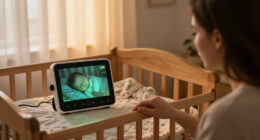
When comparing baby monitors with night vision, the central choice is whether you want a dedicated parent unit or the flexibility of checking a camera through an app. Non-Wi-Fi monitors send night-vision video to a separate handheld screen, while Wi-Fi models connect the camera to your home network and can make viewing available on a phone from elsewhere. Both can show a dark nursery using infrared illumination, so the more useful questions are who can view the feed, where you need to view it, and what happens if the network or power fails. A local monitor is usually the simpler fit for parents who want a private, ready-to-use screen at home. A Wi-Fi monitor suits families who value remote access, app alerts, or sharing access with another caregiver, provided they are comfortable setting up and maintaining a connected device.

Turn the school run and nap time into listening time
- Thousands of audiobooks, podcasts and originals
- Listen on your phone, tablet or Echo — also offline
- Cancel anytime
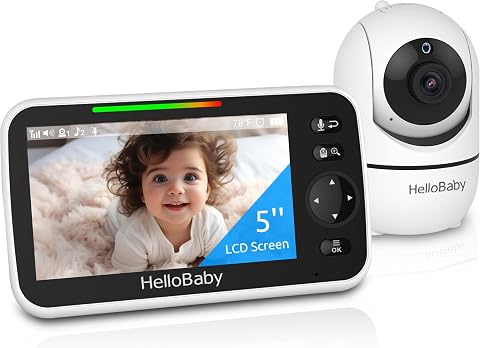
HelloBaby HB6550 No-WiFi Baby Monitor with Camera and 5-Inch Screen
- ✔ Screen: 5-inch color display
- ✔ Night vision: Infrared with invisible LEDs
- ✔ Camera movement: 355° horizontal pan; 120° vertical tilt

GoodBaby 5-Inch Video Baby Monitor with Camera, Audio, and No Wi-Fi
- ✔ Display: 5-inch IPS LCD
- ✔ Video resolution: 480p
- ✔ Night vision: Infrared

HelloBaby HB6560 6-Inch Non-WiFi Video Baby Monitor with Camera and Audio
- ✔ Display: 6-inch IPS screen
- ✔ Night vision: Infrared
- ✔ Camera movement: 355° pan; 120° tilt
At a Glance
| Criteria | Non-Wi-Fi baby monitors with night vision | Wi-Fi baby monitors with night vision | Winner |
|---|---|---|---|
| Night vision and image | Infrared night vision on the camera; video appears on the included parent unit. Image quality and viewing range vary by model. | Infrared night vision on the camera; video appears in an app. Resolution, low-light clarity, and infrared performance vary by model. | Depends |
| Where you can view | Typically limited to the local range of the camera and parent unit. | Often available on the home network and remotely through the internet; remote access depends on the model and connection. | B |
| Privacy and account security | No internet account is needed for basic viewing; privacy still depends on the model’s local connection and security design. | Remote viewing can require an account and internet connection. Strong passwords, account security, software updates, and access controls matter. | A |
| Reliability and outages | Can work without home internet, but still depends on camera and parent-unit power, battery, and local signal. | Remote access depends on internet and service availability; some models may support local viewing or recording, but check the specifications. | A |
| Setup and everyday use | Usually pair the camera with a dedicated screen; no Wi-Fi or app setup is needed for basic use. | Requires Wi-Fi and app setup; offers phone-based viewing, with features shaped by the manufacturer and subscription terms. | A |
| Alerts and extra features | Common features include sound alerts and room temperature readings; features vary, and remote phone alerts are generally absent. | May provide motion or sound alerts, activity history, or sharing options; included features and fees vary by model. | B |
| Cost and value | Often less expensive than connected models, though price and included features vary. | Can cost more or require a subscription for selected features; value depends on whether remote access and app functions are useful to you. | A |
HelloBaby HB6550 No-WiFi Baby Monitor with Camera and 5-Inch Screen
The HelloBaby HB6550 earns our top spot by pairing the essentials for night monitoring with room to grow. Its infrared night vision is joined by a 5-inch color screen and remotely controlled pan and tilt, so caregivers can adjust the view from the parent unit instead of walking back to the camera. The 2× zoom offers a closer look when the wide view makes it hard to check on a small movement.Compared with the GoodBaby SM663, the HB6550 is the more flexible option for families planning to monitor several rooms: it supports up to four cameras, while GoodBaby’s supplied setup includes one camera. Both have a 5-inch screen, FHSS without Wi-Fi, and matching stated pan and tilt coverage. The HB6550 also includes two-way audio, temperature alerts, and eight lullabies, giving it useful soothing functions without requiring an app.Its main compromise is that the camera needs corded power, as do the other camera setups described here, so placement depends on access to an outlet. The monitor’s up-to-30-hour battery claim is appealing, but the provided information does not specify conditions for that estimate. It is also not water resistant. Buyers seeking the largest screen should consider the HB6560’s 6-inch IPS display; those who need feeding alarms may prefer GoodBaby’s more explicit timer feature.
Pros:
- Infrared night vision with invisible LEDs for viewing in low light.
- Remote 355-degree pan, 120-degree tilt, and 2× zoom.
- Supports up to four cameras, more than the other listed models.
- No-Wi-Fi FHSS connection plus two-way audio, temperature alerts, and lullabies.
Cons:
- Camera requires corded electric power, which can constrain placement.
- Not water resistant.
- The supplied details do not state battery life conditions, making comparison with mode-specific estimates difficult.
Best for: Families who want a dedicated no-Wi-Fi monitor with remote camera control and the option to add cameras in more rooms.
Not ideal for: Caregivers who need a larger-than-5-inch display, a feeding timer, or a camera that can be placed without nearby corded power.
Bottom line: We recommend the HB6550 for its balanced night-viewing tools and the broadest stated camera expansion in this group.
“We recommend the HB6550 for its balanced night-viewing tools and the broadest stated camera expansion in this group.”
GoodBaby 5-Inch Video Baby Monitor with Camera, Audio, and No Wi-Fi
GoodBaby’s SM663 is a strong fit when parents want nighttime viewing plus reminders built into the same dedicated monitor. It has infrared night vision, remote pan and tilt, and 2× zoom, matching the core camera controls on the HB6550. Its feeding timer alarm gives it a distinct role for caregivers who want a prompt during overnight routines; it also includes two-way audio, temperature alerts, and eight lullabies.The battery information is unusually useful for setting expectations: GoodBaby lists up to 30 hours in VOX mode, but up to 10 hours with the screen on. VOX mode can help extend monitoring when the display is not continuously active, though buyers who keep the video visible should plan around the shorter estimate. That distinction makes its battery claim more concrete than the HB6550’s unspecified up-to-30-hour figure, while still leaving actual runtime dependent on use.There is a clear image-detail tradeoff. The 480p video resolution is specified, while the HelloBaby models’ supplied details do not state a resolution for comparison. The SM663’s 5-inch IPS LCD is smaller than the HB6560’s 6-inch screen, and its 1,000-foot range is a stated maximum rather than a promise for every home. Choose it for the feature set and VOX behavior; skip it if detailed video or long screen-on use is your priority.
Pros:
- Infrared night vision plus remote pan, tilt, and 2× zoom.
- Feeding timer alarm, two-way audio, temperature alerts, and lullabies.
- Up to 30 hours of battery life in VOX mode.
- No-Wi-Fi FHSS connection and a stated range of up to 1,000 feet.
Cons:
- Video is specified as 480p.
- Listed battery life drops to up to 10 hours with the screen on.
- The supplied package includes one camera, and no multi-camera capacity is specified.
Best for: Caregivers who want VOX mode, a feeding timer, and a dedicated no-Wi-Fi monitor for overnight routines.
Not ideal for: Buyers who prioritize higher stated video resolution or expect the display to remain on for most of the night.
Bottom line: The SM663 is the most routine-focused pick here, provided its 480p video and shorter screen-on estimate suit your expectations.
“The SM663 is the most routine-focused pick here, provided its 480p video and shorter screen-on estimate suit your expectations.”
HelloBaby HB6560 6-Inch Non-WiFi Video Baby Monitor with Camera and Audio
When the parent unit’s viewing area matters more than adding several cameras, the HelloBaby HB6560 is the standout. Its 6-inch IPS screen is the largest among these three options, which can make it easier to check the infrared night-vision image at a glance. Remote 355-degree pan and 120-degree tilt help sweep a room from the parent unit, and sound-level LED indicators provide another way to notice activity when the screen is not the focus.Compared with the HB6550, the HB6560 trades camera expansion for a larger display: it supports up to two cameras with split-screen viewing, whereas the HB6550 supports up to four. It also describes its 2.4 GHz connection as digital encrypted and works without Wi-Fi, an app, or an account. That may appeal to households seeking a self-contained setup. Like the other models, it includes two-way audio, temperature alerts, and eight lullabies; a feeding timer and VOX/ECO modes add useful routine controls.The main limitation is compatibility: it works with the HB6560-2 and HB6560, rather than a broad range of monitor models. Its tabletop or wall-mount choices are also narrower than the HB6550 and GoodBaby mounting lists. The stated 16–30-hour battery span does not clarify which use conditions correspond to each end, so it should not be read as a guarantee of all-night screen-on operation. Pick it for the larger IPS display; choose the HB6550 if adding more cameras is the deciding factor.
Pros:
- Largest screen in this comparison: a 6-inch IPS display.
- Infrared night vision with remote wide pan and tilt.
- Encrypted no-Wi-Fi connection without an app or account.
- Split-screen support for up to two cameras, with VOX/ECO mode and a feeding timer.
Cons:
- Supports two cameras, compared with up to four on the HB6550.
- Compatibility is limited to HB6560 and HB6560-2 models.
- The 16–30-hour battery range is not tied to specific usage conditions.
Best for: Caregivers who want a larger parent-unit screen for checking an infrared night image and need no more than two camera views.
Not ideal for: Families planning to connect three or more cameras or mix this monitor with other HelloBaby models.
Bottom line: Choose the HB6560 when a larger display improves your nighttime checks and two camera feeds are enough.
“Choose the HB6560 when a larger display improves your nighttime checks and two camera feeds are enough.”
As an Amazon Associate we earn from qualifying purchases.
Key Differences
Night vision itself does not settle the choice. Both types use infrared light to show a dark room, and performance depends more on the specific camera, lens, sensor, and screen or app than on whether the monitor connects to Wi-Fi. A dedicated parent unit gives you a separate screen you can keep nearby and check without unlocking a phone. A Wi-Fi model puts the view on a device you already own and may let you check in from work or another location. That remote reach is the defining benefit of connected monitoring.
The tradeoff is that remote access adds dependencies. A Wi-Fi camera may rely on the home network, an app, a user account, and sometimes the manufacturer’s service. That can be worthwhile when a parent or caregiver needs to check from outside the home, but it also calls for careful account security and a review of ongoing fees. A local system is generally easier to use when internet access is unreliable or you want to avoid app setup, though its parent unit only works within the system’s range. Choose according to where you need to see the nursery and how much setup you are willing to manage.
Detailed Comparison
Night vision and image (moderate difference)
Both options can show a baby in a dark room through infrared night vision. Neither connection type guarantees a clearer picture: low-light performance, camera placement, screen size, and image processing depend on the model. This is a model-by-model decision, so compare sample footage or detailed specifications and check whether the infrared illumination covers the nursery. Winner: Depends. The gap is usually minor between connection types themselves, but can be major between cameras with different sensors or lenses.
Where you can view (Wi-Fi baby monitors with night vision wins — major)
A non-Wi-Fi system typically lets you watch on its paired parent unit within local range. Wi-Fi models can put the feed in an app at home and, if remote viewing is supported, wherever you have an internet connection. That reach is a major advantage for Wi-Fi if you need to check from outside the home. If you only watch while in the house, the dedicated screen may be more convenient than opening an app.
Privacy and account security (Non-Wi-Fi baby monitors with night vision wins — moderate)
A local monitor can provide basic viewing without an internet account, which removes some connected-device exposure and makes access simpler to manage. Wi-Fi monitoring can involve an app login, cloud services, and sharing permissions; secure passwords, two-factor authentication when offered, and timely updates help protect access. Local systems are not automatically secure, and Wi-Fi systems are not automatically unsafe, so the exact design matters. For families who prefer fewer online dependencies, Option A has a moderate practical advantage.
Reliability and outages (Non-Wi-Fi baby monitors with night vision wins — moderate)
A non-Wi-Fi parent unit does not need the home internet connection for its basic local feed, so a broadband outage need not stop viewing. Wi-Fi systems may lose remote access if the router, internet service, app, or cloud service is unavailable; some retain local viewing, but this is model-specific. Both still need power and a functioning camera, and local systems can have range or interference problems. Option A wins by a moderate margin for households that want fewer network dependencies.
Setup and everyday use (Non-Wi-Fi baby monitors with night vision wins — moderate)
A dedicated monitor commonly pairs the camera with a parent screen, avoiding Wi-Fi credentials, account creation, and app permissions for ordinary viewing. A Wi-Fi camera needs network and app setup, and the process can take more troubleshooting when the signal is weak or the network changes. After setup, phone access may feel natural to parents who already use app-based home devices. For a ready-to-use bedside screen, Option A wins by a moderate margin; for phone-first households, the difference may be minor.
Alerts and extra features (Wi-Fi baby monitors with night vision wins — moderate)
Both types may offer sound alerts or temperature readings, depending on the model. Wi-Fi cameras may add phone notifications for sound or motion, caregiver sharing, or recorded clips, but feature availability varies and some functions may require a subscription. Those additions help when a caregiver is away from the parent unit; for overnight viewing at home, they may add little. Option B wins by a moderate margin for app alerts and sharing, while buyers should check which features are free and which rely on paid services.
Cost and value (Non-Wi-Fi baby monitors with night vision wins — moderate)
Non-Wi-Fi models are often the lower-cost route to a camera, infrared night vision, and a viewing screen. Wi-Fi models can justify a higher purchase price when remote access or useful app alerts solve a real need, but subscriptions can raise the total cost over time. Prices and bundled features differ widely, so compare the full cost and the specific functions you will use. Option A is usually the better value for in-home monitoring; paying more for Option B makes sense when remote viewing matters enough to use regularly.
Non-Wi-Fi baby monitors with night vision: Pros and Cons
Pros:
- Basic viewing usually works without home internet or an app account.
- A dedicated parent unit is ready to check without unlocking a phone.
- Often costs less for straightforward in-home monitoring.
- Local operation reduces reliance on app and cloud services.
Cons:
- The parent unit generally needs to stay within the system’s local range.
- A caregiver away from home usually cannot check the video feed.
- Some models offer fewer app alerts or sharing features.
- Range, interference, battery life, and image quality still vary by model.
Wi-Fi baby monitors with night vision: Pros and Cons
Pros:
- Remote viewing can let parents check the nursery from outside the home.
- Uses a phone or tablet instead of requiring a separate parent screen.
- May support app alerts, caregiver sharing, or video history.
- Can suit caregivers who already manage connected devices through apps.
Cons:
- Setup depends on Wi-Fi and an app, and remote access can fail during outages.
- Account access and connected-device security need ongoing attention.
- Some features may require a recurring subscription.
- Phone notifications and app controls may be less convenient than a dedicated screen for quick checks.
Who Should Choose What
Choose Non-Wi-Fi baby monitors with night vision if:
- You mainly watch the nursery from home and want a dedicated parent screen.
- You want basic night-vision viewing without relying on internet service or an app.
- Your home internet is unreliable or you prefer fewer connected-device accounts.
- You want to keep costs down and do not need to check the feed while away.
Choose Wi-Fi baby monitors with night vision if:
- You regularly need to view the nursery while away from home.
- You want alerts on your phone or app-based access for another caregiver.
- You are comfortable setting up a connected camera and securing its account.
- The model’s remote access and included features justify its price or subscription for your routine.
Skip both if: Neither fits if the camera’s documented night-vision performance, local range, power setup, or security approach fails your needs. Compare specific models, since these vary more than the connection labels suggest.
Value for Money
A non-Wi-Fi monitor is usually the stronger value when the job is to watch a sleeping baby at home: it can deliver night vision and a dedicated screen without paying extra for remote access you rarely use. A Wi-Fi model earns its higher cost when checking from outside the house, getting app alerts, or sharing access makes a genuine difference to daily care. Check the full cost, including any subscription required for video history or other features you expect to use. Paying more for a Wi-Fi camera is reasonable for frequent remote monitoring; for in-home checks alone, the added connectivity may not repay its cost.
Final Verdict
For most families who monitor from home, choose a non-Wi-Fi baby monitor with night vision. It offers a direct camera-to-parent-unit routine, avoids routine dependence on an app and home internet, and often costs less. Choose a Wi-Fi model when remote viewing is the deciding need and you are willing to manage network setup, account security, and any feature fees. The biggest deciding factor is where you need to view the baby: inside the home favors a local parent unit, while regular checks from elsewhere favor Wi-Fi.
Frequently Asked Questions
Do Wi-Fi baby monitors have better night vision?
Not by default. Both Wi-Fi and non-Wi-Fi cameras can use infrared night vision. Compare the specific camera’s low-light image, infrared coverage, resolution, and performance in a dark room rather than relying on its connection type.
Can a Wi-Fi baby monitor work without internet?
It depends on the model. Some may offer local viewing or recording when the internet is down, while remote viewing and cloud features generally need an internet connection. Check the product specifications for offline behavior before buying.
Are non-Wi-Fi baby monitors safer?
A local model can avoid internet accounts and remote access, reducing some connected-device risks. Its safety still depends on the design of its local connection and controls. For Wi-Fi models, use a unique strong password, enable extra account protection when available, and install updates.
Is a Wi-Fi monitor worth paying more for?
It can be if you often check the nursery while away or need app notifications and caregiver sharing. If you mainly watch from home and do not use those features, a less expensive monitor with a dedicated parent unit is usually better value.